


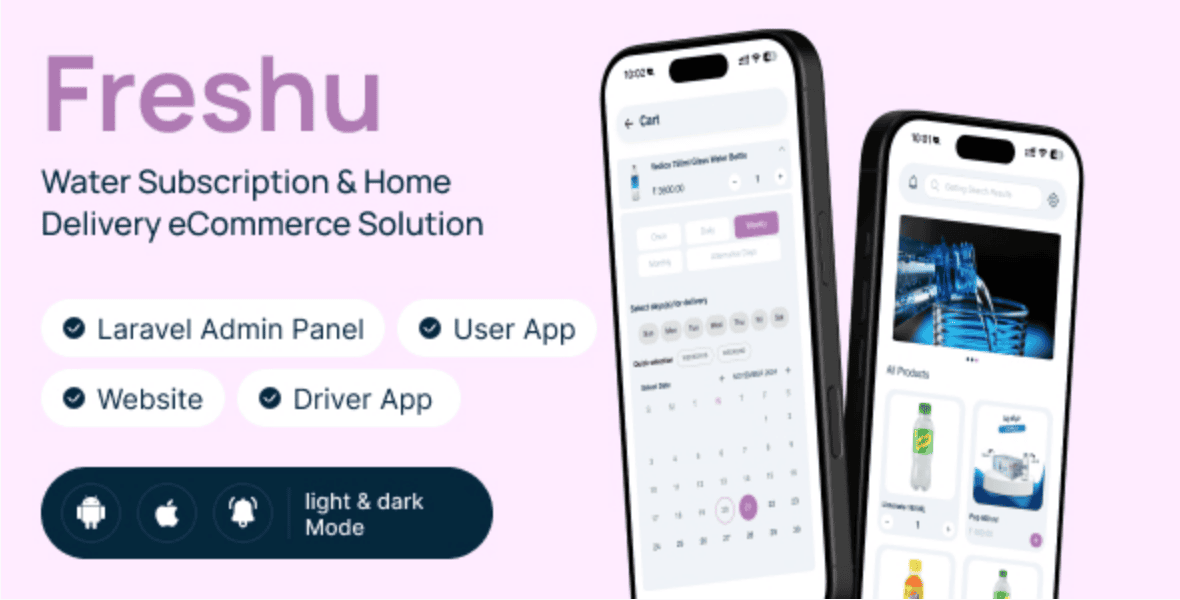
If you’re looking to launch a modern water delivery subscription business or build a scalable eCommerce mobile app, then the Freshu Flutter App is exactly what you need. In this guide, we’ll break down everything from installation to customization—based on the full walkthrough in the video below.
Whether you’re a developer, entrepreneur, or agency owner, this tutorial will help you get your app up and running quickly without unnecessary stress.
🎥 Watch the Full Installation Video
👉 Watch here: https://youtu.be/18EUSfjbNy8
🚀 What is Freshu Flutter App?
Freshu is a Flutter-based mobile application designed for water delivery and subscription services. It allows customers to:
- Subscribe to daily/weekly water delivery
- Order water products on-demand
- Manage delivery schedules
- Make secure payments
For business owners, it provides a powerful backend to manage orders, users, deliveries, and payments seamlessly.
💡 Why Choose Freshu for Your Business?
Here’s why Freshu stands out:
- ⚡ Built with Flutter (fast, cross-platform performance)
- 📱 Android & iOS support
- 💳 Integrated payment gateways
- 📦 Subscription-based system
- 🔧 Easy customization
- 🌐 Scalable backend
If you’re planning to launch a water delivery startup, this app saves months of development time.
🛠️ Step-by-Step Freshu Flutter App Installation Guide
Let’s break down the installation process in a simple way.
1. Download the Source Code
You can get the Freshu app from Envato:
👉 Download here: https://1.envato.market/DWyxVo
This includes:
- Flutter app source code
- Backend/API files
- Documentation
2. Set Up Your Development Environment
Before installation, make sure you have:
- Flutter SDK installed
- Android Studio / VS Code
- Xcode (for iOS)
- Firebase account
👉 Official Flutter setup guide: https://docs.flutter.dev/get-started/install
3. Configure the Backend
Freshu comes with a backend that powers the app.
Steps:
- Upload backend files to your server
- Configure database (MySQL recommended)
- Update API endpoints
👉 You can use reliable hosting providers like:
4. Set Up Firebase
Firebase is used for:
- Push notifications
- Authentication
- Analytics
Steps:
- Create a Firebase project
- Add Android & iOS apps
- Download
google-services.jsonandGoogleService-Info.plist - Integrate into your Flutter project
5. Configure the Flutter App
Now open the project in your IDE:
- Update API URLs
- Set app name & package name
- Configure payment gateway keys
- Customize UI (logo, colors, branding)
6. Run the App
Use this command:
flutter pub get
flutter run
Boom! 🎉 Your app should now be running.
7. Build APK / IPA
To launch your app:
- Android:
flutter build apk
- iOS:
flutter build ios
🔥 Pro Tips for Customization
Want your app to stand out? Here’s what you should tweak:
- 🎨 UI/UX design (colors, fonts, layout)
- 🧾 Subscription plans
- 💰 Payment integration (Stripe, Paystack, Flutterwave)
- 📍 Delivery zones
- 📦 Product categories
💼 Want It Done For You?
If you don’t want to stress over setup, customization, or deployment…
👉 Hire me: https://wa.link/6ifn6q
I can help you with:
- Full installation
- App customization
- Backend setup
- Deployment to Play Store & App Store
📈 SEO & Business Growth Tips
After launching your app, focus on growth:
- Optimize your app listing (ASO)
- Use social media marketing
- Run targeted ads
- Offer referral bonuses
- Build a website landing page
👉 Example: Create a landing page like your service site to convert visitors into customers.
🔗 Join Our Community
Stay updated and learn more:
👉 Join WhatsApp Channel: https://whatsapp.com/channel/0029VbB7qwp4IBhBjdLiQB18
🌐 Internal Linking Ideas
If you run a blog or website, link this article to:
- Mobile App Development Services
- Flutter App Tutorials
- eCommerce App Setup Guides
- Startup Business Ideas
- Delivery App Development
🎯 Final Thoughts
The Freshu Flutter App is a powerful solution for anyone looking to break into the delivery and subscription business space. With the right setup and customization, you can launch a fully functional app in no time.
If you follow the steps in this guide and the video, you’ll avoid common mistakes and get your app running smoothly.
🚀 Ready to Get Started?
- 🎥 Watch the video: https://youtu.be/18EUSfjbNy8
- 📦 Get the app: https://1.envato.market/DWyxVo
- 💼 Hire me: https://wa.link/6ifn6q
Don’t forget to share this post and bookmark it for later!
Let’s build something amazing 🚀
How to Install Freshu Flutter App | Water Subscription & Delivery eCommerce App Setup (Step-by-Step)





Leave a Reply