


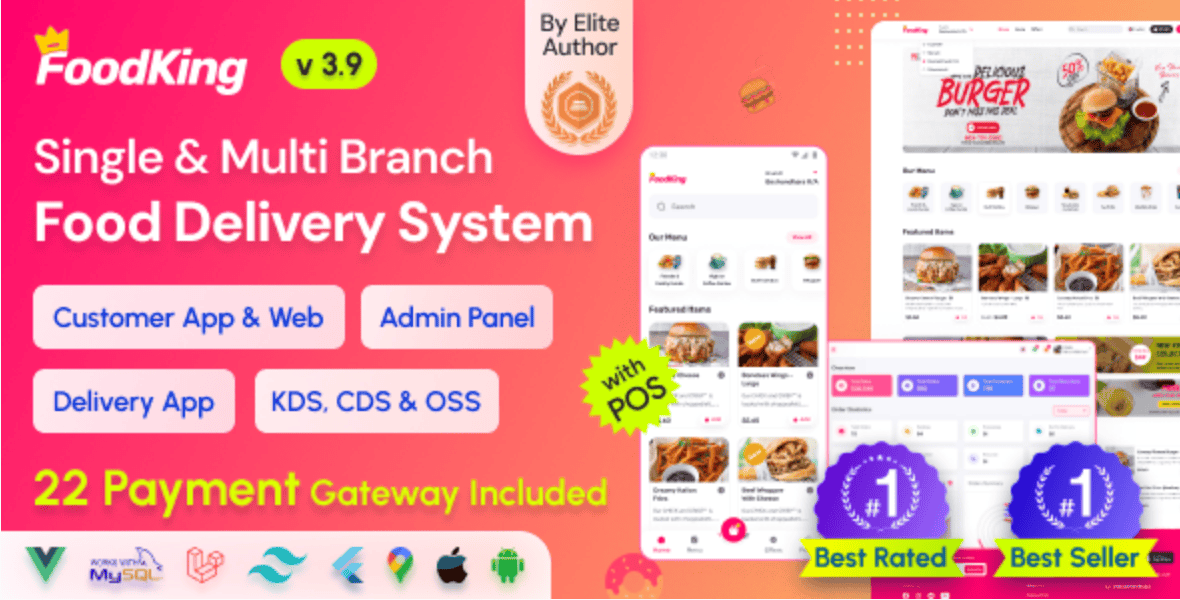
If you’re looking to build a powerful food delivery business, streamline restaurant operations, or launch your own Uber Eats-style platform, then FoodKing is one of the best solutions out there. In this guide, we’ll walk you through everything you need to know—from installation to optimization—based on the video tutorial below 👇
🎥 Watch the Full Installation Video
👉 Watch here: https://youtu.be/NUy7vr_ToqE
This step-by-step video shows you exactly how to install and set up the FoodKing system with admin panel, POS, and delivery man app.
🚀 What is FoodKing?
FoodKing is a complete restaurant food delivery system that includes:
- Admin dashboard
- Restaurant/vendor panel
- Delivery man mobile app
- POS (Point of Sale) system
- Customer ordering interface
It’s designed for entrepreneurs, developers, and restaurant owners who want to digitize food ordering and delivery operations without building everything from scratch.
🔥 Why Choose FoodKing?
Here’s why FoodKing stands out in the crowded food delivery software space:
- Easy installation process
- Fully customizable system
- Scalable for startups and enterprises
- Built-in POS system for restaurants
- Multi-vendor support
- Real-time order tracking
- Mobile app integration
Whether you’re starting small or aiming big, FoodKing gives you everything you need.
🛠️ Step-by-Step Guide to Installing FoodKing
Let’s break down the installation process in a simple and beginner-friendly way.
1. Purchase & Download the Script
You can get FoodKing from Envato Market:
👉 Download here: https://1.envato.market/3kJQ5d
Once purchased, download the script files to your system.
2. Upload Files to Your Server
- Log in to your hosting cPanel or server
- Open File Manager
- Upload the FoodKing ZIP file
- Extract it into your desired directory (usually
public_html)
3. Create a Database
- Go to MySQL Databases
- Create a new database
- Create a database user
- Assign the user to the database with full permissions
4. Configure Environment File
Locate the .env file and update the following:
- Database name
- Username
- Password
- App URL
This step is crucial for connecting your app to the database.
5. Run Installation Wizard
- Visit your domain in a browser
- Follow the installation wizard
- Enter database credentials
- Complete setup
6. Login to Admin Panel
Once installation is complete:
- Access your admin dashboard
- Configure settings
- Add restaurants, menus, and delivery zones
📱 Setting Up the Delivery Man App
FoodKing also includes a delivery mobile app. Here’s how to get it running:
- Open the app source code in Android Studio
- Update API base URL
- Customize branding (logo, colors)
- Build APK file
- Deploy to delivery agents
💡 Pro Tips for Better Performance
To make your FoodKing platform more powerful:
- Use a VPS or cloud hosting for speed
- Enable caching
- Optimize images
- Integrate payment gateways
- Set up push notifications
💼 Want It Done for You?
If you don’t want to stress yourself with setup, customization, or deployment…
👉 Hire Me: https://wa.link/6ifn6q
I can help you with:
- Full installation
- Mobile app setup
- Custom features
- UI/UX improvements
- SEO optimization
📢 Join Our WhatsApp Community
Stay updated with tutorials, tools, and opportunities:
👉 https://whatsapp.com/channel/0029VbB7qwp4IBhBjdLiQB18
🔗 Helpful Resources & Backlinks
For credibility and deeper learning, check out:
- https://laravel.com (Framework used by many scripts like FoodKing)
- https://developer.android.com (For mobile app setup)
- https://www.mysql.com (Database management)
🔗 Internal Recommendations
If you’re serious about launching digital products or services, you might also want to explore:
- Website development services
- Mobile app development
- SaaS platform creation
- Payment gateway integration
(Reach out via the “Hire Me” link above to get started.)
🎯 Final Thoughts
FoodKing is a game-changer if you want to build a professional food delivery platform without coding everything from scratch. With its all-in-one features—admin panel, POS, delivery app—you’re already miles ahead.
If you’re serious about launching your own platform:
- Watch the full video
- Grab the script
- Or hire an expert to handle everything for you
👉 Start here: https://wa.link/6ifn6q
🚀 Ready to Launch?
- 🎥 Watch the tutorial: https://youtu.be/NUy7vr_ToqE
- 🛒 Get the script: https://1.envato.market/3kJQ5d
- 💼 Hire an expert: https://wa.link/6ifn6q
Let’s build something amazing.
How to Install FoodKing – Restaurant Food Delivery System with Admin Panel & Delivery Man App | POS




Leave a Reply