


CVGuide to Install Chatzy | WhatsApp Clone Chat & Call App.
If you’ve ever dreamed of launching your own WhatsApp-like chat and call application, this guide is for you.
In this detailed walkthrough, we break down the complete installation process of Chatzy, a powerful WhatsApp clone chat & call app that includes User App, Web App, and Admin Dashboard exactly as shown in the video tutorial below.
Whether you’re a startup founder, mobile app entrepreneur, SaaS builder, or developer, this post will help you understand how Chatzy works, how to install it correctly, and how to customize it for real-world use.
👉 Watch the full YouTube video tutorial here:
Watch YouTube Video
What Is Chatzy?
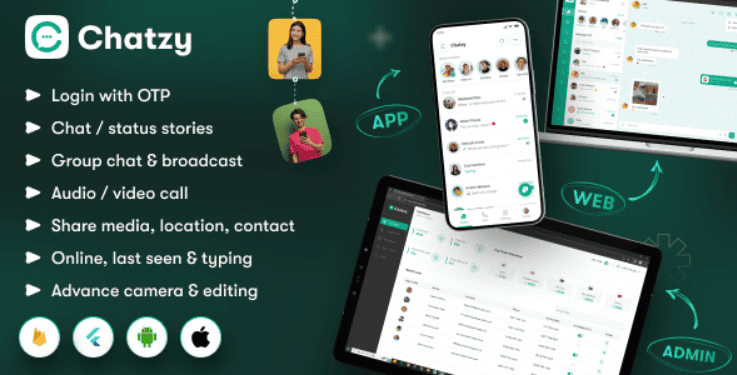
Chatzy is a feature-rich WhatsApp clone script that allows you to build a real-time messaging and calling platform similar to WhatsApp, Telegram, or Signal.
It typically includes:
-
User Mobile App (Android / iOS)
-
Web Chat Application
-
Admin Panel (Backend Dashboard)
With Chatzy, you can launch a fully functional chat system with private chats, media sharing, voice calls, and admin-level controls without building everything from scratch.
.👉 Watch the full installation tutorial here:
🎥 Watch on YouTube
Features of the Chatzy WhatsApp Clone App
Before installation, let’s look at what makes Chatzy attractive:
✅ User App Features
-
Real-time one-to-one chat
-
Voice & call functionality
-
Media sharing (images, videos, documents)
-
User authentication & profiles
-
Online/offline presence
-
Push notifications
✅ Web App Features
-
Web-based chat access
-
Syncs with mobile app
-
Responsive UI
-
Secure login
✅ Admin Panel Features
-
User management
-
Message moderation
-
App configuration
-
Server & notification settings
-
Analytics & logs
This setup makes Chatzy ideal for:
-
WhatsApp-like startups
-
Internal company chat systems
-
Community or niche messaging apps
-
White-label chat solutions
-
If you’re missing any of the above, don’t worry, I’ve got full setup tutorials available! You can hire me here for installation and customization.
🛠️ Step-by-Step Guide to Install Chatzy
Now let’s get into the actual installation process, simplified and beginner-friendly.
⚠️ Note: Exact steps may vary slightly depending on your hosting, but the flow remains the same.
Step 1: Download the Chatzy Script
Chatzy is usually purchased from marketplaces like Envato Market, where you receive:
-
Source code (User App, Web App, Admin Panel)
-
Documentation
-
Database files
-
API keys guide
👉 Get Chat Scripts & Apps on Envato:
Envato Market – Affiliate Link
Step 2: Server & Hosting Requirements
Before installing, ensure your server supports:
-
PHP (recommended: PHP 8+)
-
MySQL / MariaDB
-
Apache or Nginx
-
SSL (HTTPS is mandatory)
-
Firebase account (for notifications)
-
Android Studio / Xcode (for mobile apps)
A VPS or Cloud hosting is strongly recommended for real-time apps.
Step 3: Upload Backend & Admin Panel
-
Upload the backend files to your server (usually via cPanel or SSH)
-
Create a MySQL database
-
Import the provided
.sqlfile -
Update database credentials in the config file
-
Set correct file permissions
-
Enable SSL
Once done, access the Admin Dashboard via your browser and log in.
Step 4: Configure Firebase & Notifications
Chatzy relies heavily on Firebase for:
-
Push notifications
-
Real-time messaging
-
User authentication (in some versions)
Steps include:
-
Create a Firebase project
-
Enable Cloud Messaging
-
Add Firebase keys to the backend & mobile app
-
Download
google-services.json - Want a sleek custom UI or dark mode? Hire me to brand your Chatzy app in your business style.
Step 5: Set Up the Android & iOS Apps
-
Open the mobile app source code in Android Studio
-
Update:
-
API base URL
-
Firebase credentials
-
App name, logo & package name
-
-
Build the APK / AAB
-
Repeat similar steps for iOS using XcodeNeed help? Hire me here for full installation, customization, and Play Store upload support.
Step 6: Test Everything Thoroughly
Before launch, test:
-
User registration
-
Chat delivery speed
-
Calls
-
Media uploads
-
Admin controls
-
Notifications
-
Web chat syncNeed help? Hire me here for full installation, customization, and Play Store upload support.
🔗 Why Use a Ready-Made WhatsApp Clone Like Chatzy?
Building a chat app from scratch can take months and cost thousands of dollars.
Chatzy allows you to:
-
Launch faster
-
Save development cost
-
Customize branding
-
Focus on marketing & growth
Perfect for founders with MVP goals.
📈 SEO, Monetization & Growth Ideas
Once installed, you can monetize Chatzy by:
-
Subscription plans
-
In-app ads
-
Premium features
-
White-label licensing
-
Community memberships
You can also integrate:
-
Payment gateways
-
SMS verification APIs
-
Email marketing tools
🧠 Pro Tip: Don’t Install Alone If You’re Not Technical
Many people break their app during setup due to:
-
Wrong Firebase setup
-
Incorrect server permissions
-
API misconfiguration
-
App signing errors
If you want a clean, production-ready installation, Hire me here for full installation, customization, and Play Store upload support.
👨💻 Hire Me for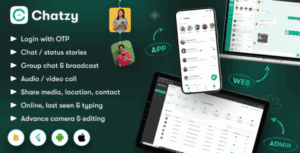 Installation, Customization & Scaling
If you need help with:
-
✅ Chatzy installation
-
✅ WhatsApp clone customization
-
✅ Mobile & web app deployment
-
✅ Server optimization
-
✅ Firebase & notification setup
-
✅ Branding & monetization
👉 Hire Me Here:
Hire Me – Mobile & Website Development
📢 Join Our WhatsApp Channel
Get:
-
App scripts
-
Installation tips
-
SaaS ideas
-
Tech tutorials
-
Monetization strategies
👉 Join Our WhatsApp Channel:
https://whatsapp.com/channel/0029VaExample
🔗 Internal & External SEO Links
Internal Links (Example):
-
Mobile App Development Services
-
Script Installation Services
-
SaaS Product Launch Guide
Authoritative Backlinks:
-
Firebase Documentation – Google
-
Android Developers Portal
-
Apple Developer Documentation
🎯 Call to Action (CTA)
👉 Watch the full tutorial on YouTube
👉 Download quality scripts from Envato
👉 Hire a professional to avoid costly mistakes
👉 Join our WhatsApp Channel for daily value
💼 Hire Me for Development/ Installation / Customization
Need help installing Chatzy or customizing your own chat or call app?
👉 Hire Me for:
- Flutter & Firebase Integration
- Web & Admin Setup
- UI Customization
- App Store Publishing
- App Branding and Monetization
Whether it’s Chatzy or your next big app idea — I’ll help you bring it to life fast and professionally




Leave a Reply