


If you’ve ever thought about launching your own Uber-like home service app, this guide is exactly what you need. Platforms like Demandium make it possible to build a fully functional multi-provider on-demand service app—without starting from scratch.
In this detailed guide, we’ll walk you through how to install Demandium, what it offers, and how you can turn it into a profitable business. Whether you’re targeting handyman services, cleaning, plumbing, or full-scale home service operations, this setup can get you live faster than you think.
🎥 Watch the Full Installation Tutorial
Before we dive into the breakdown, here’s the full step-by-step video guide:
👉 https://youtu.be/T_-Eti79hzA
Make sure you watch it alongside this article for a smoother setup experience.
🚀 What is Demandium?
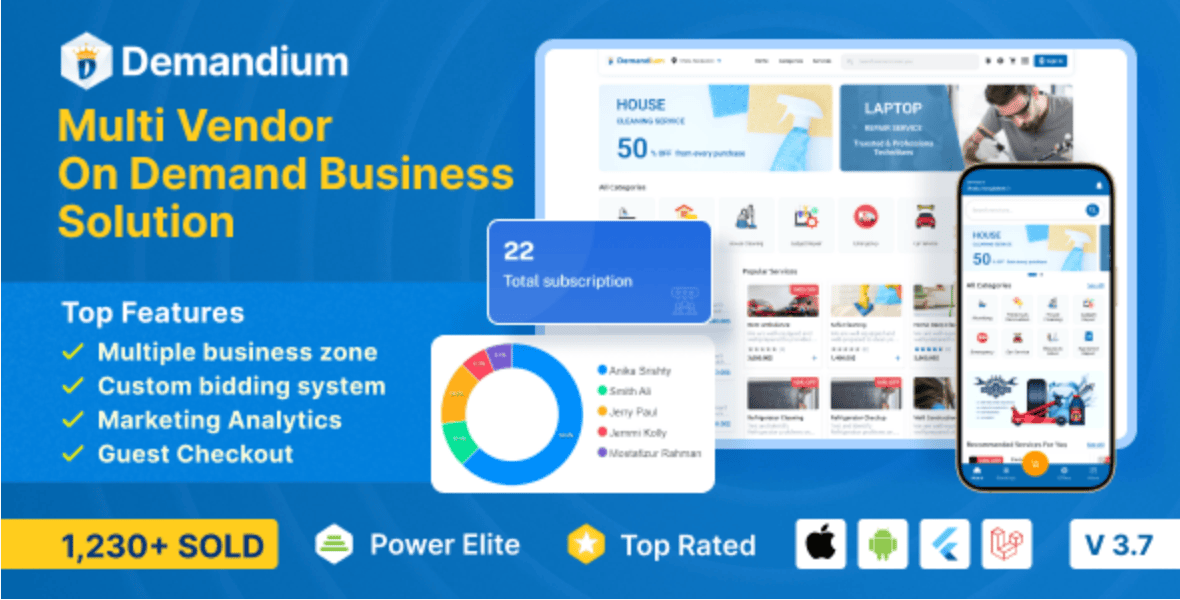
Demandium is a ready-made multi-provider on-demand service solution that includes:
- Customer mobile app
- Service provider app
- Admin panel (web dashboard)
It’s designed for businesses that want to launch platforms similar to:
- Home service apps (cleaning, plumbing, electrical)
- Handyman booking platforms
- Multi-vendor service marketplaces
Instead of building everything from scratch, Demandium gives you a complete ecosystem you can customize and deploy quickly.
💡 Why Use Demandium?
Let’s be real—building an app like this from zero can cost thousands of dollars and months of development time.
Demandium simplifies everything:
- ✅ Pre-built architecture
- ✅ Multi-provider system
- ✅ Admin control panel
- ✅ Scalable backend
- ✅ Payment integrations
- ✅ Easy customization
If you’re serious about launching a service marketplace business, this is one of the fastest ways to start.
👉 You can get it here: https://1.envato.market/dyOzm3
🧰 System Requirements Before Installation
Before installing Demandium, make sure you have:
- A VPS or hosting server (recommended: cloud VPS)
- Domain name
- SSL certificate
- PHP (latest version recommended)
- MySQL database
- FTP or cPanel access
If you’re not familiar with server setup, don’t worry—you can always hire help.
👉 Need professional help? Hire me here: https://wa.link/6ifn6q
⚙️ Step-by-Step Guide to Install Demandium
1. Purchase and Download Files
Start by purchasing Demandium from Envato Market:
👉 https://1.envato.market/dyOzm3
After purchase:
- Download the full package
- Extract the files on your computer
2. Upload Files to Server
Use either:
- cPanel File Manager
- FTP (FileZilla recommended)
Upload the files into your domain’s root directory (usually public_html).
3. Create a Database
Go to your hosting panel and:
- Create a new MySQL database
- Create a database user
- Assign user to the database
- Save credentials (you’ll need them)
4. Configure Environment File
Locate the .env file and update:
- Database name
- Username
- Password
- App URL
This step connects your app to the database.
5. Run Installation Wizard
Once everything is uploaded:
- Visit your domain in a browser
- The installation wizard will appear
- Follow the on-screen steps
You’ll input:
- Database credentials
- Admin login details
6. Access Admin Panel
After installation:
- Login to admin dashboard
- Configure system settings
- Add service categories
- Set pricing models
This is where your business comes to life.
7. Setup Mobile Apps
Demandium includes:
- Customer app
- Provider app
You’ll need to:
- Customize branding
- Update API keys
- Compile APK/IPA files
🔑 Key Features of Demandium
Here’s what makes Demandium powerful:
- Multi-provider service system
- Real-time booking management
- Push notifications
- Payment gateway integration
- Service scheduling
- Ratings & reviews
- Admin analytics dashboard
💼 Business Opportunities with Demandium
This isn’t just an app—it’s a business engine.
You can launch:
- Uber for home services
- Cleaning service marketplace
- Freelance handyman platform
- Repair service booking app
- Local service aggregation platform
With the right marketing, this can become a high-income digital business.
🔗 Internal Resources You May Find Useful
If you’re building a digital platform, you may also want to:
- Create a high-converting landing page
- Set up WhatsApp lead generation
- Build a SaaS backend system
👉 Join our WhatsApp channel for updates and tips:
https://whatsapp.com/channel/0029VbB7qwp4IBhBjdLiQB18
🌍 SEO & Growth Tips After Installation
Once your app is live:
1. Optimize for Local SEO
Target your city or country (e.g., Nigeria, Lagos, Abuja)
2. Use Paid Ads
Run Facebook and Google Ads for service bookings
3. Leverage WhatsApp Marketing
Drive users directly to chat for faster conversion
4. Build Trust
Add reviews, testimonials, and ratings
🔗 Authority Backlinks for Credibility
To strengthen your platform and SEO, explore:
These platforms support infrastructure and development best practices.
📞 Need Help? Let’s Work Together
If you don’t want to struggle with installation, customization, or deployment—I’ve got you covered.
👉 Hire me for:
- Full Demandium installation
- Mobile app setup
- Customization & branding
- SEO optimization
Click here to get started:
https://wa.link/6ifn6q
🎯 Final Thoughts
Demandium is one of the most powerful tools available right now for launching a service-based startup quickly. With the right setup, marketing, and execution, you can build a scalable business that connects customers with service providers seamlessly.
Don’t just watch—take action.
👉 Watch the full tutorial again:
https://youtu.be/T_-Eti79hzA
👉 Get Demandium here:
https://1.envato.market/dyOzm3
👉 Join our community:
https://whatsapp.com/channel/0029VbB7qwp4IBhBjdLiQB18
If you want, I can also create:
- A landing page for this app
- Marketing funnel
- Monetization strategy for your niche
Just tell me 👍
How-to-install-demandium-multi-provider-on-demand-handyman-home-service-app-with-admin-panel



Leave a Reply